Driver monitoring cameras
Identify possible driver risk. Alert in the moment. Support better coaching.
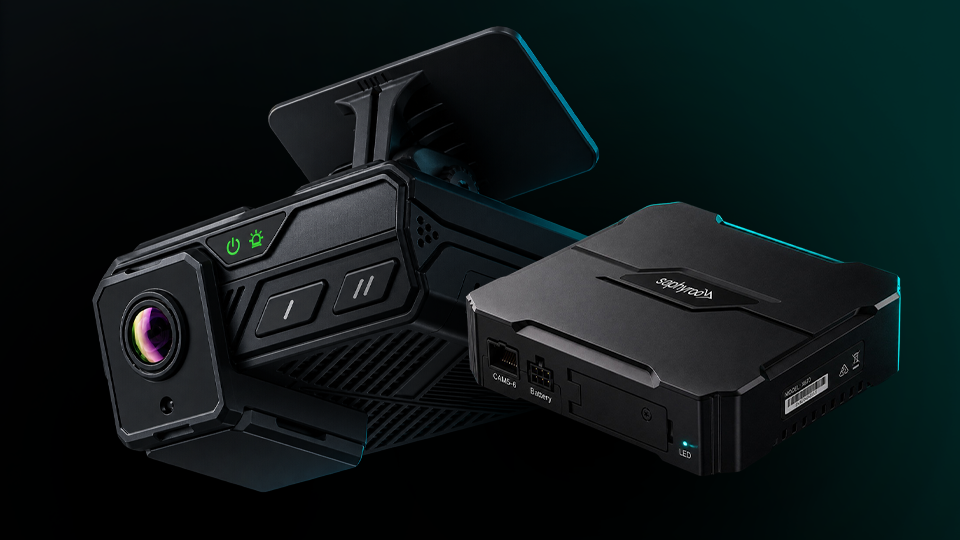
Driver-facing cameras and supported DMS devices can generate indicators for possible distraction, fatigue-related behaviour and seatbelt use. Connected to Vision360 for review, coaching support and evidence.
Delivery, warranty, returns and installation commitments pending an owner before this page goes public.
Real-time in-cab alerts
Where supported.
Possible-event indicators
Where supported.
Coaching & driver development
Turn events into habits.
Privacy by design
And driver trust.
Support
Expert help when you need it.
Driver fatigue and distraction cameras
Four options: driver-facing only, dual-facing, a dedicated DMS sensor, or infrared for low light.
Driver Monitoring Camera
In-cab camera for fatigue and distraction detection. Pairs with a dashcam or MDVR. Contact sales.
- Type: Dedicated DMS camera
- Detection: Fatigue, distraction, phone use, smoking, seatbelt (where supported)
- Resolution: 1080P
Scoped to your fleet.

Why fleets choose driver monitoring
- Identify possible distraction and fatigue-related behaviours
- Provide in-cab alerts to support drivers in the moment
- Add cabin context to road events for fairer review
- Support driver coaching and development
- Build a culture of safety and accountability
What Vision360 adds
- Review the event with road and cabin side by side
- Confirm or dismiss, then assign coaching
- Driver acknowledges and comments
- Follow-up and trend analysis
- Role-based access and audit logs
How it works: from indicator to action
Capture
The camera records in-cab video locally.
Upload
Selected footage or event data uploads over Wi-Fi or 4G.
Identify
The camera or Vision360 identifies a possible event indicator, where supported.
Alert
The driver receives an in-cab audio or visual alert, where supported.
Review
Authorised users review the footage and its context in Vision360.
Retain
Evidence is retained securely and linked to your workflow.
2.Why fleets choose driver monitoring
Identify possible distraction and fatigue-related behaviours
Provide in-cab alerts to support drivers in the moment
Add cabin context to road events for fairer review
Support driver coaching and development
Build a culture of safety and accountability
3.Supported possible-event indicators
Availability varies by model.
| Indicator | DM1 Driver-facing | DM2 Dual-facing | DMS-S1 Sensor | DM4 IR Cabin |
|---|---|---|---|---|
| Distraction indicator | ||||
| Fatigue-related indicator | — | |||
| Seatbelt indicator | ||||
| Mobile phone use indicator | — | |||
| Smoking indicator | — | |||
| Driver absence indicator | — | |||
| In-cab audio alerts | — |
4.How it works: from indicator to action
Capture
The camera records in-cab video locally.
Upload
Selected footage or event data uploads over Wi-Fi or 4G.
Identify
The camera or Vision360 identifies a possible event indicator, where supported.
Alert
The driver receives an in-cab audio or visual alert, where supported.
Review
Authorised users review the footage and its context in Vision360.
Retain
Evidence is retained securely and linked to your workflow.
5.In-cab alert experience
Where supported.
- Audio alert, spoken in the cab
- Visual alert on the device
- Sensitivity set per fleet
- The driver hears it before anyone else does
6.Video review & coaching workflow
- 1Possible-event indicator generated
- 2Event reviewed in Vision360
- 3Confirmed or dismissed
- 4Coaching assigned to driver
- 5Driver acknowledges and comments
- 6Follow-up and trend analysis
7.Privacy by design
Driver-facing status indicator
Shows when cameras are recording.
Privacy mode
Where supported, for breaks and non-driving time.
Role-based access controls
Only authorised users view footage.
Audio recording status visible
Where supported.
Configurable data retention
And download controls.
Communicate clearly with drivers
Support your privacy policy.
8.On-device vs in Vision360
On the device
- Processes supported indicators
- Delivers immediate in-cab alerts
- Stores footage securely
- Continues operating when connectivity is interrupted, depending on model
In Vision360
- Receives events or requested footage
- Authorised review and sharing
- Coaching and outcomes management
- Device health monitoring
- Secure evidence handling and reporting
9.Installation & placement guidance
- Position the camera to clearly see the driver's face
- Top-centre of the windscreen behind the mirror is ideal
- Avoid steering wheel obstruction
- Calibrate after installation and after repositioning
- Consider sunglasses, PPE and lighting conditions
- Supports left-hand and right-hand drive vehicles
Privacy, placement and where the work happens
Privacy by design
Drivers should know where they stand.
- A driver-facing status indicator shows when cameras are recording
- Privacy mode where supported, for breaks and non-driving time
- Role-based access controls, so only authorised users view footage
- Audio recording status visible where supported
- Configurable data retention and download controls
On the device vs in Vision360
What happens where.
- On device: processes supported indicators, delivers immediate in-cab alerts, stores footage securely, keeps working when connectivity drops
- In Vision360: receives events or requested footage, authorised review and sharing, coaching and outcomes, device health, secure evidence handling
Installation & placement guidance
Position matters more than people expect.
- Position the camera to clearly see the driver's face
- Top-centre of the windscreen behind the mirror is ideal
- Avoid steering wheel obstruction
- Calibrate after installation and after any repositioning
- Consider sunglasses, PPE and lighting conditions
- Supports left-hand and right-hand drive
Bundles
Driver Monitoring Starter Kit: DM1 camera, 128GB SD card and power cable.
Compatibility
Check vehicle, camera and Vision360 compatibility before you buy.
Accessories
Cables, mounts, cameras, SD cards and more.
Already using Saphyroo?
Add driver-facing cameras to your existing Vision360 fleet.
Ready to support your drivers and improve safety?
Book a demo to see Vision360 in action, or speak with our team.