Marine & workboats
Marine Fleet Management Software for Boats, Barges and Crews
For mooring contractors, marine services and workboat operators. Roster crews and boats, send the day’s jobs to their phones, track servicing and crew tickets and see where each boat is, without the shared spreadsheet and the morning ring-around.

- Crews & vesselsSee who’s free and which boat is available, today and this week.
- Service jobsAllocate mooring and marine service jobs to a crew and a boat.
- Servicing & defectsService history and open defects for each vessel.
- Crew ticketsCertificates and medicals tracked with expiry dates and reminders.
- Short-notice jobs coveredFind a free crew and boat without ringing round.
- Boats ready to workServicing due dates and defects visible before a boat heads out.
- Crews cleared to goTickets and medicals checked before anyone is rostered.
- One record per boatJobs, servicing, documents and trips on the boat’s own record.
From a Spreadsheet Roster to One Connected System
- 01
Set up your boats and crew
Add each boat and barge, your crew and the tickets each person holds.
- 02
Roster crews to boats
Build the week’s roster, assign a crew to each boat and see clashes before they happen.
- 03
Allocate the day’s jobs
Send mooring and service jobs to the crew’s phones, with the details they need on the water.
- 04
Keep the record
Servicing, defects, documents and trips build up against each boat. When a client asks what was done, it’s there.
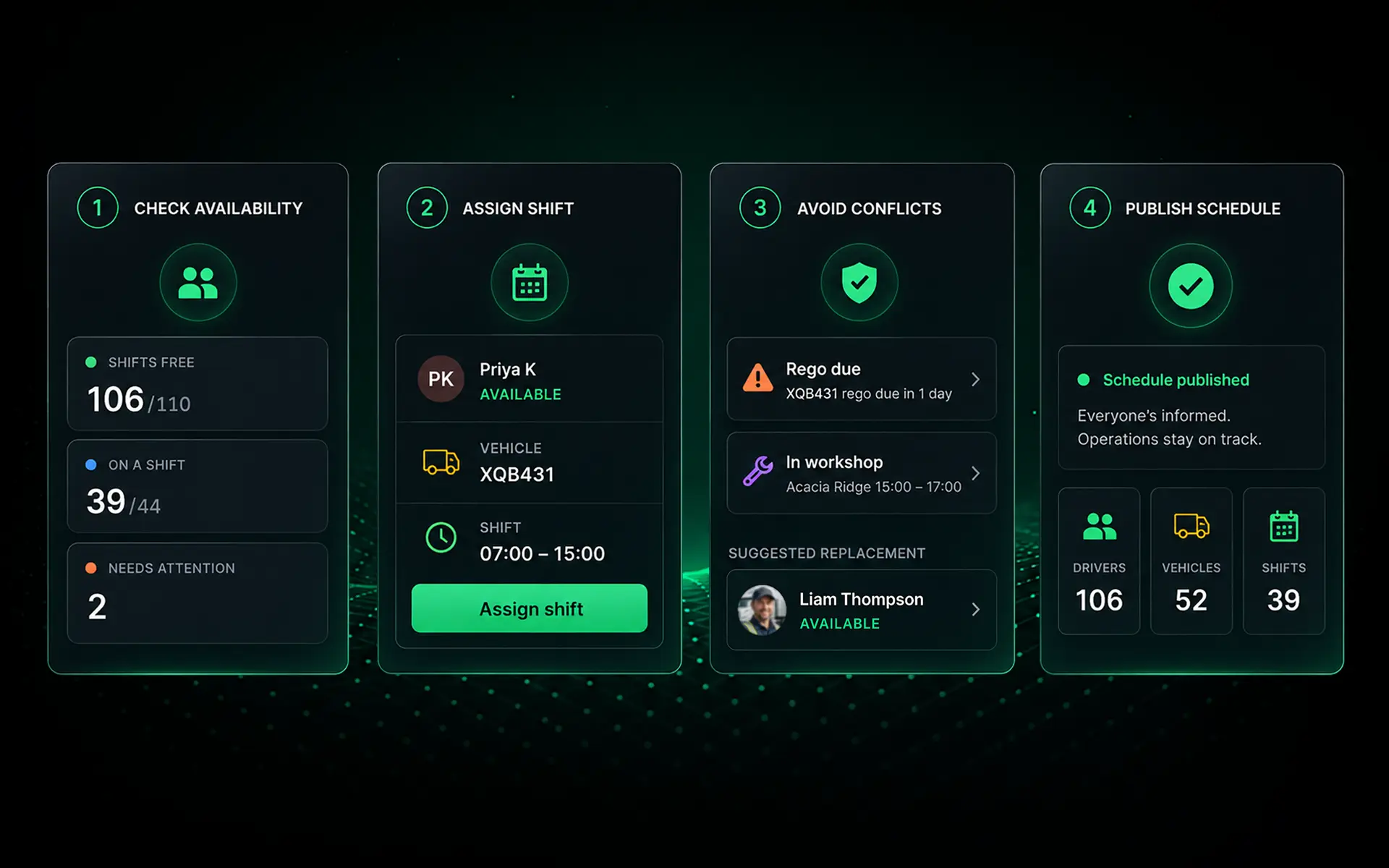
Rostering
Crew Scheduling for Boats, Without the Spreadsheet
Who’s free today
See which crew are available, on leave or already rostered. See which boats are free or in for servicing.
Short-notice changes
When a job comes in or someone calls in sick, find someone with the right tickets and update the roster. They see the change on their phone.
Rosters on every phone
Crew see their shifts and the boat they’re on in the Saphyroo app. They accept changes from their phone.
Clashes flagged early
Get warned when a crew member’s ticket has expired or a boat is booked in for servicing.
Servicing and defects
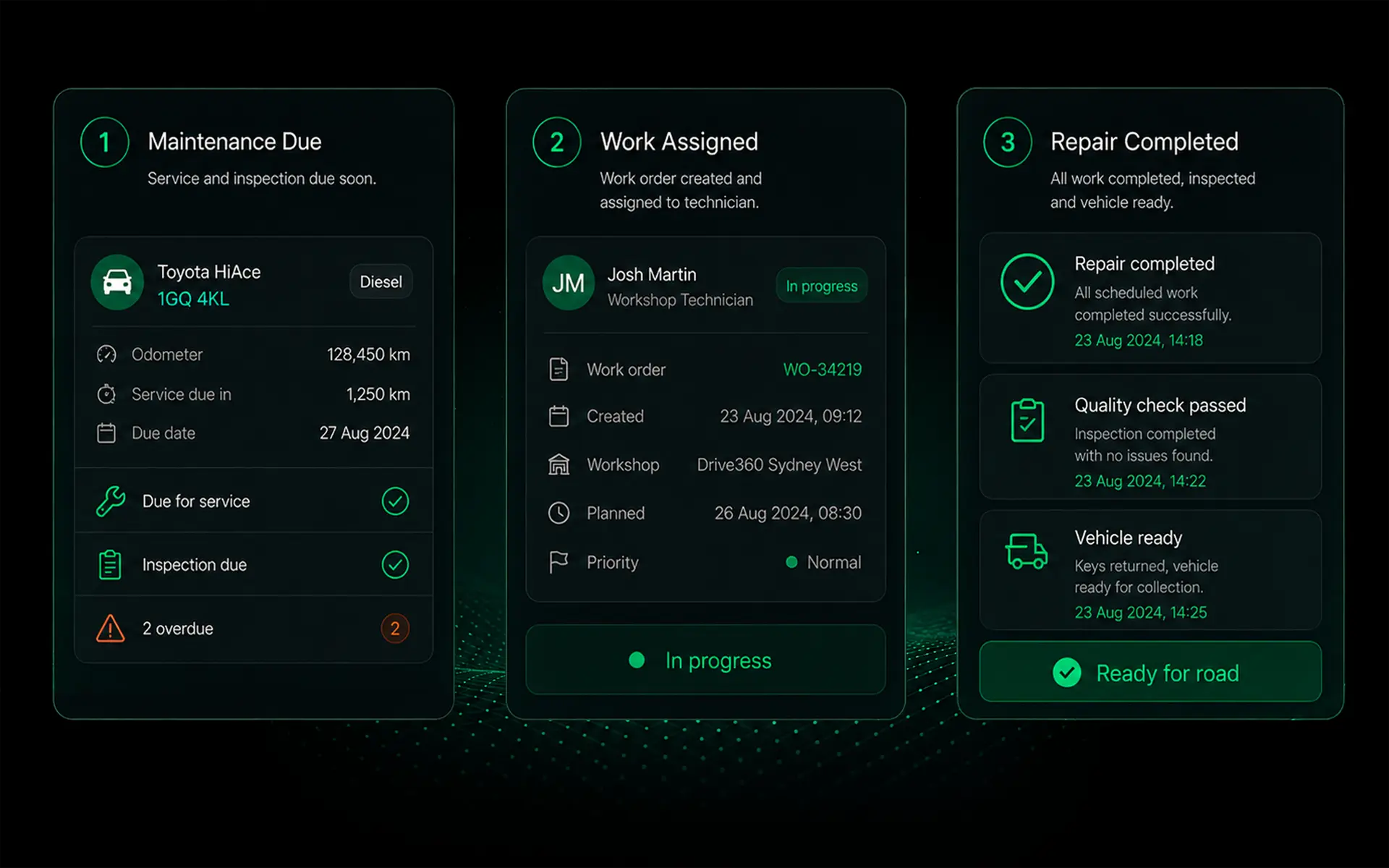
Marine Maintenance, Defects and Repairs
Service schedules
Set servicing by date or engine hours for each vessel, motor and piece of gear.
Defects from the deck
Crew report a defect with photos from their phone, so it’s fixed before the next job.
Work orders and history
Track repairs to completion and keep a full service history for every boat.
Pre-departure checks
Run your own checklist before a boat heads out, with answers and photos on record.
Tickets and documents
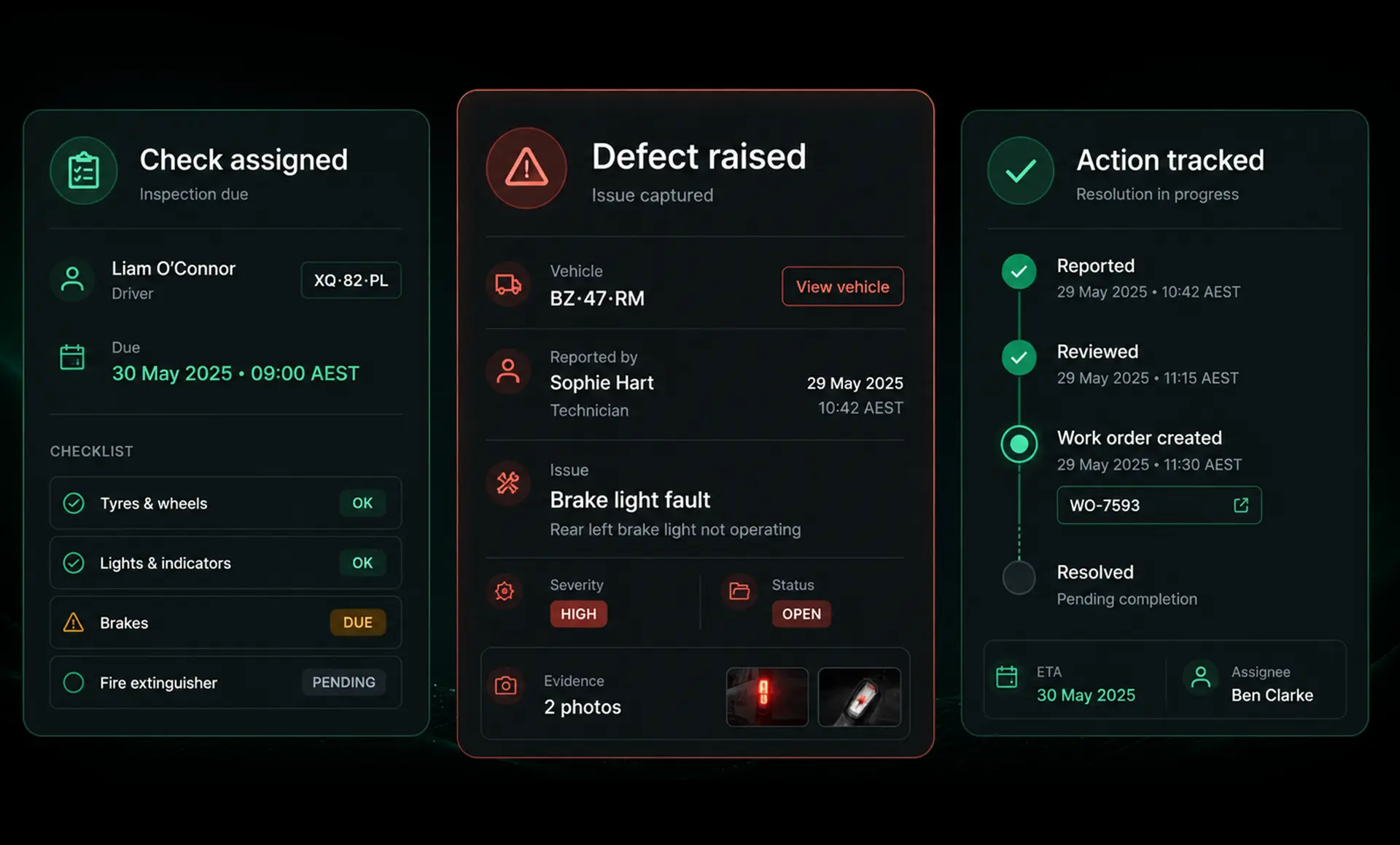
Crew Certificates and Vessel Documents
Crew certificates with expiry
Record each person’s tickets, such as coxswain and master certificates, dive medicals and inductions, with reminders before they expire.
Vessel documents
Keep survey certificates, registrations and insurance against each boat, with renewal dates.
Proof for clients and audits
Photos and documents sit with the requirement they prove.
Who’s cleared for which boat
Only crew with current tickets show as available for the work that needs them.
Location
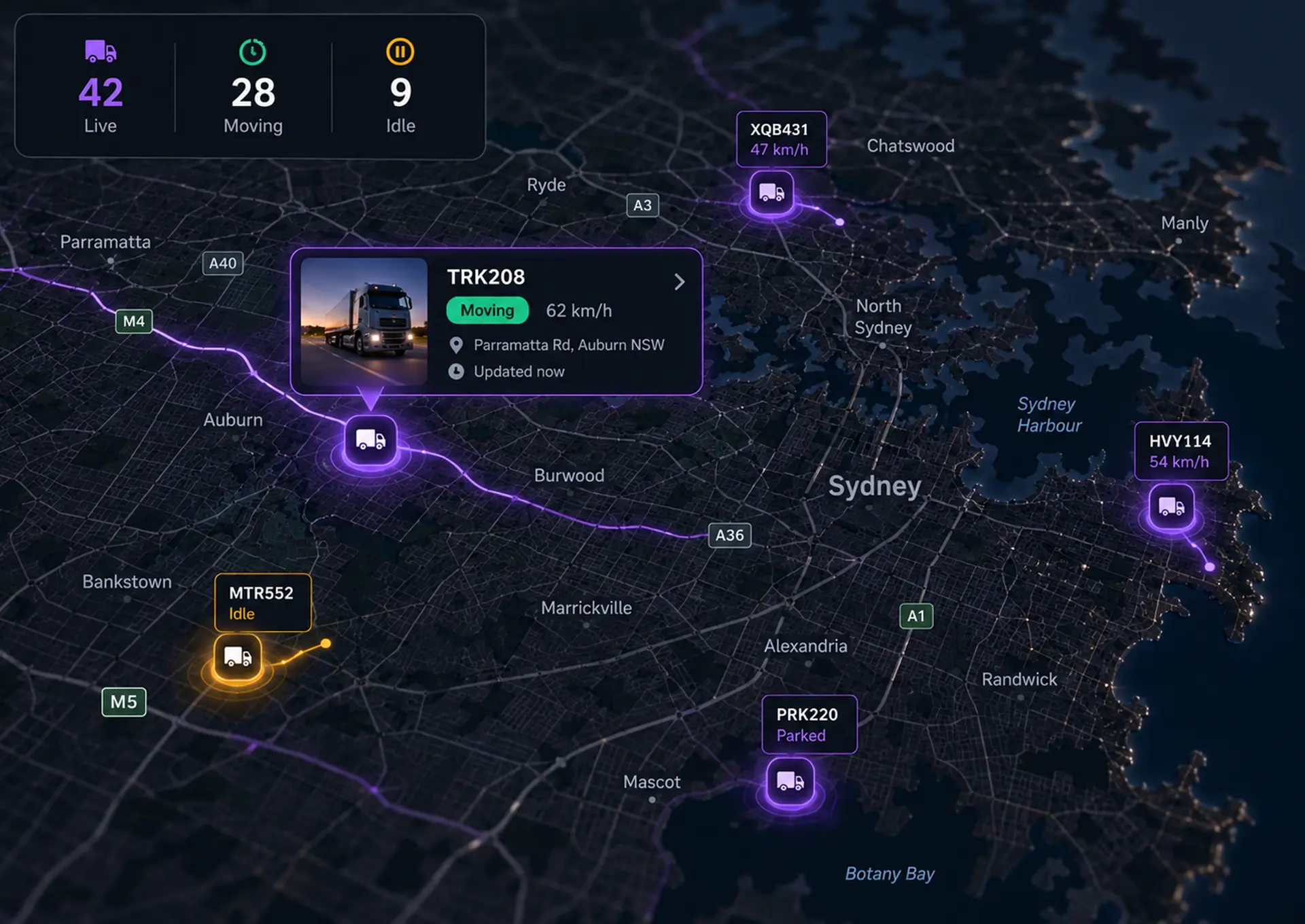
Vessel Tracking Where Your Boats Work
Live location in mobile coverage
A waterproof 4G tracker, wired to the boat’s battery, is able to show live position and trip history wherever your vessels work within mobile coverage.
History when coverage drops
Positions recorded out of coverage upload when the boat is back in range.
Boats, utes and trailers on one map
See your vessels alongside the vehicles and trailers that support them on land.
Working further offshore?
Boats beyond mobile coverage need satellite tracking. Tell us where you work and we’ll tell you what fits.
Compare
Saphyroo vs Spreadsheets and Ship Management Software
Ship management systems are built for large vessels and full maritime compliance. Spreadsheets struggle once the fleet grows. Saphyroo is built for smaller operators running boats, crews and service jobs.
| Feature | Saphyroo | Spreadsheets & phone calls | Ship management software |
|---|---|---|---|
| Crew and vessel roster | Live roster | Shared sheet | Varies by product |
| Short-notice availability | Who’s free, on one screen | Phone around | Varies by product |
| Jobs sent to crew phones | Saphyroo app | Calls and texts | Varies by product |
| Servicing and defects | Schedules and work orders | Manual reminders | Planned maintenance |
| Crew tickets with expiry | Reminders before expiry | Manual tracking | Crew certification |
| Vessel location | Inshore, 4G tracker | None | Varies by product |
| Full maritime compliance (safety management system, class surveys) | Not our focus | None | Core feature |
Compares typical tools by category, not specific products. Features vary by provider.
Pricing
Drive360
From A$1 per user per day
On a 36-month term. Excludes GST.
- Billed only on the days each person uses it
- Choose from 12, 24 or 36 month plans
- Hardware is available on a rental basis
Questions
Questions Marine Operators Ask
What is marine fleet management software?
Also called vessel management software, it runs the day-to-day of a working fleet of boats: who’s rostered on which boat, what jobs they’re doing, when each vessel and motor is due for servicing, which crew tickets are about to expire and where the boats are.
What should a small marine operator keep records of?
At a minimum, crew tickets and medical expiry dates, vessel survey and registration renewals, servicing by engine hours, defects with their repairs and a record of each job. Your marine safety regulator sets the full list.
Can I use Saphyroo for boats instead of vehicles?
Yes. A mooring contractor asked us exactly that. Each boat and barge is set up as an asset, so you can roster crew to it, log servicing and defects, store its documents and see where it is.
Who is it built for?
Smaller marine operators running boats, crews and service jobs: mooring contractors, marine services, workboats and aquaculture support. It isn’t ship management software for large vessels.
Does it replace my vessel safety management system?
No. It keeps the people, servicing, checks and documents behind your safety management system organised and up to date, but it doesn’t replace the system itself.
Does tracking work at sea?
Within mobile coverage, a waterproof 4G tracker is able to show each boat’s live position and trip history. Beyond coverage, boats need satellite tracking. Tell us where you work and we’ll recommend the right setup.
Can crew use it on the water?
Yes. Crew see their roster, jobs and checks in the Saphyroo app on their phone. Records sync when they’re back in coverage.
Keep Your Boats and Crews Working
Bring one week of your real roster to a demo and see it run in Saphyroo.